PTZ camera moves on its own (quick fix)
Does your PTZ camera moves on its own and drives you crazy?Yeah, that happened to me as well.I have a Hikvision Mini PTZ camera that suddenly started moving by itself, and I got scared at first, but later I realized what the problem was and how to fix it.Let’s take a look at the problem […]
iVMS-4500 Not Working On Mobile Data (solved)
In this article, I talk about the iVMS-4500 not working on mobile data and how to solve this issue by checking some basic things in your network and configuration.Let’s take a look at how to fix this problem.Why is the i-VMS-4500 not working on Mobile Data?Even if the Hikvision i-VMS-4500 is working correctly via Wi-Fi, […]

How to Find the IP Address of a Security Camera [ with Examples ]
In this article, I show you how to find the IP address of a security camera.It doesn’t matter the camera manufacturer, brand, or model you have. There are different ways to find the IP address, and here I show examples you can follow. I tested every example on this article in my lab, and they […]

Where are Amcrest cameras manufactured?
In this article, I answer the question “Where are Amcrest cameras manufactured?”Since this brand is largely available in the market, more people are concerned with the product origin and quality, so let’s talk about this topic.Amcrest cameras are manufactured in ChinaYes, Amcrest cameras are manufactured in China.I believe you already had an idea that this […]
Amcrest Camera: How to manually record to a SD card
This article shows how to configure an Amcrest camera to record to an SD card manually. The process is straightforward and takes less than 5 minutes. Make sure you use a micro SD card that is compatible with your camera. Configure the SD card manual recordingHere are the steps to configure the Amcrest SD card […]

How to update Amcrest camera firmware
In this video, I explain how to update Amcrest camera firmware.The process is straightforward and takes less than 5 minutes.With the update, it’s possible to fix known issues and also activate new features. How To Upgrade the FirmwareTo upgrade the firmware, use a web browser and follow the steps below:Download the upgrade file (link below);Login to […]

DVR User Locked (How to solve)
You are here because you got the “User Locked”message when trying to log in to your DVR, right? If that’s the case, please read this article to find the solution.Sometimes you can also get a slightly different message, such as the “The account has been locked,” as shown in the picture below.This problem is very […]
Mouse Not Working on DVR or NVR [Solved]
I bet you are here because you plugged a mouse into your DVR or NVR, and it’s not working, right? Don’t worry, I had the same problem, and I found the solution.The main reason your mouse is not working on the DVR or NVR is related to incompatibility problems or the use of new technology […]

Enable ONVIF protocol on AXIS Cameras
In this article, we will go over how to enable Onvif on Axis Cameras.ONVIF is an open standard protocol that was created for the purposes of video surveillance, remote monitoring, and access control systems.This can make it much easier for integrators to connect multiple devices from different manufacturers together in one system.How to enable ONVIF […]

Videoloft Cloud Video Surveillance Review (camera cloud storage)
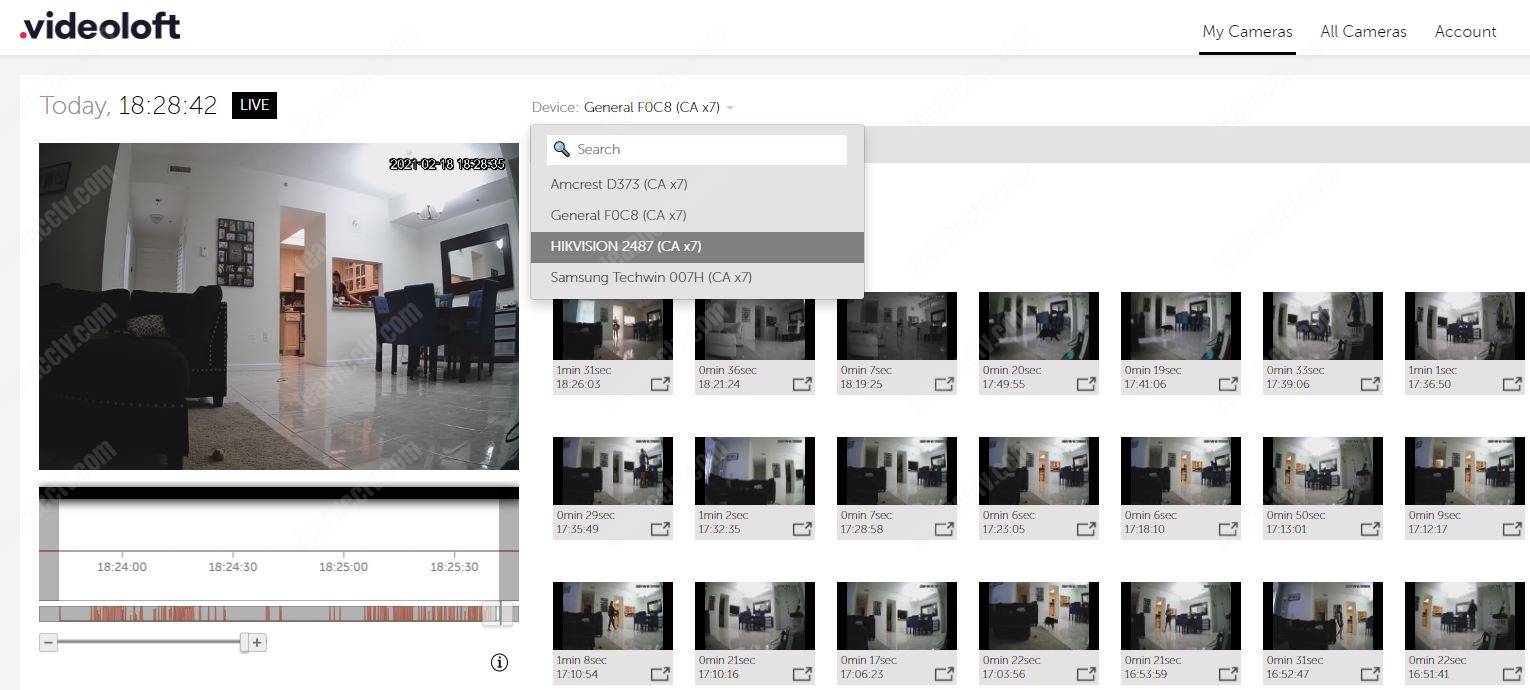
Are you looking for information about the Videoloft IP camera cloud service?Don’t look any further; in this article, I explain how this security camera cloud storage service works, and I also show how to set up the Videoloft cloud adapter. You can also use the link https://videoloft.com/learncctv to create your account on the platform and get a […]