VLAN configuration for CCTV is very important to protect the IP cameras against unauthorized access and also to separate the security camera system from other computers and devices that are connected to the IP network.
If you have layer 2 network switches such as Cisco, Netgear, HP, Dell, Dlink and others, they can be easily configured to be used on your CCTV system.

In this article, I will discuss the importance of VLANs for CCTV, how the technology works and how to do VLAN configuration for CCTV projects.
Let's start by learning the VLAN fundamentals, understand how it is used on network switches and learn how to setup VLAN for security cameras.
What are VLANs
VLAN is a technology used to segment networks by creating virtual groups.
It stands for Virtual Local Area Network and it is frequently used on network switches to create virtual groups to allow broadcast traffic control and also to increase the security access level thus avoiding unauthorized access.

On a switch it is possible to create VLANs and associate them to specific switch ports. Devices such as computers and IP cameras that are connected to the same group of ports will be able to communicate in the network.
VLAN traffic segregation
In a scenario with computers and CCTV cameras connected to the same switch it's possible to create VLANs to separate the broadcast traffic.
The diagram below shows an example of a network switch that has IP CCTV cameras and computers connected to its ports. Notice that the VLANs are created and represented by different names, IP address range, and colors.
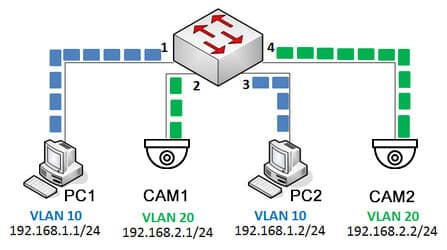
On IT environment network admins use to name VLANs by using numbers and colors. In the the picture above you can see VLAN 10 and VLAN 20 using the blue and green color respectively to represent different groups.
VLAN Security
VLAN can increase the security in the network by assigning specific switch ports to groups. See the picture below where a man's laptop is connected to port 1 on the Blue VLAN and communicates with PC2 on port 3.
An intruder removes the IP camera from its cable on port 4 to connect his laptop and hack the network. He connects to the Green VLAN to try to hack the security camera but he can't have access to the rest of the network.

The same principle applies to the company worker, he can't have access to the security camera because it's connected to a different VLAN.
How VLAN TAGs work
To be able to control the traffic a switch uses a TAG which is just a way to mark the frames that enter or leave each port,
The frames coming into switch port 1 or 3 are tagged as part of VLAN 10, and frames coming into port 2 or 4 are tagged as part of VLAN 20.
The TAG can be different depending on the switch brand, however there's a universal TAG standard called 802.1Q that is used by most manufacturers.
See the picture below. When the frames come from the IP camera to the switch they are tagged, Those tags are removed before leave the switch.

See below the tags fields according to the universal 802.1Q standard.
SOURCE: Package Source
DESTINATION: Package Destination
TYPE & LEN: Type and size
DATA: The data contained in the package
FRAME CHECK: Frame check
See the illustration of the TAG that is associated with the frame

Communication between switches
When connecting two switches it is necessary to use a special port called "Trunk Port" or "Tagged Port" that will allow the traffic of all the VLANs to pass. So the frames with the 802.1Q TAGs will pass through this port.
Some manufacturers have a slightly difference VLAN ports nomenclature. On Cisco switches documentation the term "Trunk Port" is used for those special ports. Other manufacturers such as Netgear, HP and Dell use the term "Tagged Port" but in any case all of them use 802.1Q TAGs.

Now the IP security cameras and the computers can send traffic from the first to the second switch and still keep the broadcast and security under control.
The first switch can tag the frames that come from the security camera and move them through the trunk (tagged ports) to the second switch.
Type of switches for VLAN configuration
For VLAN configuration is necessary to use layer 2 manageable switches.
Each manufacturer has a different way to create and manage VLANs by using CLI (command line interface) or Web Interface. But in any case the setup is pretty similar and it's very easy to create and configure VLANs.
Example of VLAN configuration for CCTV
Let's take a look at a CCTV camera system with 4 Desktops that use the VLAN 10 and 3 IP cameras and 1 NVR using the VLAN 20.
On this small CCTV project, the VLAN separates the corporate broadcast network traffic from the IP camera broadcast network traffic. See the diagram.

On this CCTV VLAN configuration the desktop users will not be able to have access to the IP cameras or NVR. So your security system is protected.
So, as you can see VLAN configuration for CCTV is very important to keep your system safe from hackers and intruders.
Creating VLANs on a cisco switch
As a quick example, let's see a VLAN configuration on a 8 port Cisco switch. The model is Catalyst 2960 PD that will be configured using the CLI:

USB to serial adapter
The serial cable is a special one used for Cisco Switches and the USB to serial adapter is a TrendNet TU-S9. You can find them on stores such as Amazon.

Trendnet USB to serial adapter

Cisco serial cable adapter
The console port at the left side of the switch will be used to connect a serial cable from a laptop. A CLI will be used to create and configure the VLANs

Laptop using a USB to serial adaptader